 Yuna Jo
By name alone, TVING (티빙) plans look similar in picture quality and number of connections. In practice, they differ in four ways. These are the number of simultaneous streaming devices, maximum picture quality, whether ads appear, and whether you can watch Apple TV+. Simultaneous streams are split as follows: 1 device for Double Basic[1], 2 devices for Double Slim and Double Standard[1][1], and 4 devices for Double Premium[1]. The details below include only specifications confirmed in the official TVING guide as of November 2026. The monthly fee for standalone plans is not listed, because the official guide text gives no figure. Before you pay, please check the current price on the official TVING pricing page.
TVING Plans at a Glance: Quality, Simultaneous Streams and Ads
TVING runs Double plans, which bundle it with Wavve (웨이브) in a single subscription[1]. The Double plans are Slim, Basic, Standard and Premium[1][1][1][1]. The table below covers only the TVING side of these plans. The Wavve side is covered separately later.
| Double plan | TVING tier | Simultaneous streams | Max quality | Profiles | Downloads | Apple TV+ |
|---|---|---|---|---|---|---|
| Double Slim | T Ad-supported Standard | 2 simultaneous streams | Up to FHD | 4 profiles | 15 downloads per month | Not included [1][1] |
| Double Basic | T Basic | 1 simultaneous stream | Up to HD | 4 profiles | 200 downloads per month | Not included [1][1] |
| Double Standard | T Standard | 2 simultaneous streams | Up to FHD | 4 profiles | 300 downloads per month | Not included [1][1] |
| Double Premium | T Premium | 4 simultaneous streams | FHD and some 4K (TV) | 4 profiles | 400 downloads per month | Available [1][1] |
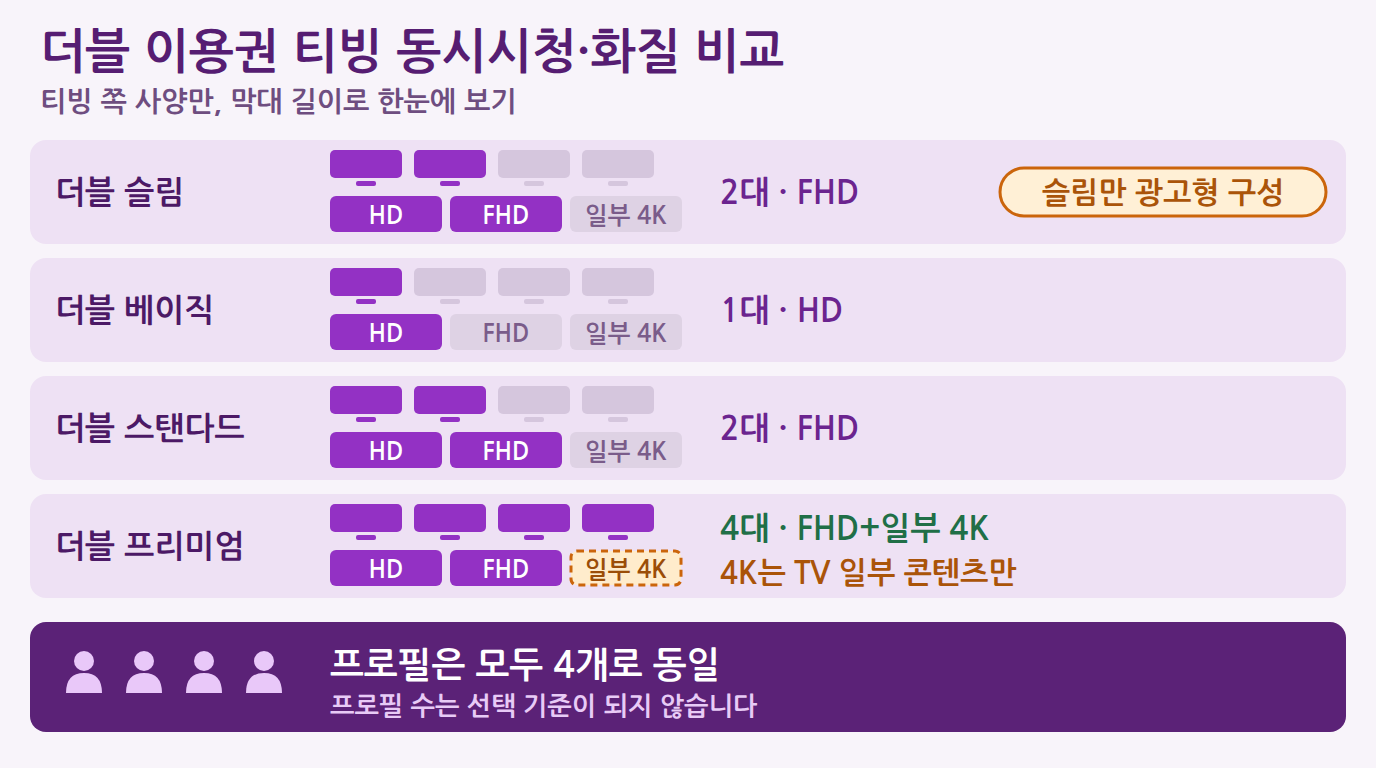
The first thing that stands out in the table is the number of profiles. On all four plans, you can create up to 4 TVING profiles[1][1][1][1], so the number of profiles is not a deciding factor. The real differences are in simultaneous streams and quality. Double Basic has 1 simultaneous stream and HD quality[1]. Slim and Standard have 2 simultaneous streams and FHD quality[1][1]. 4K is available only on Double Premium, and even then only for some content on TV[1].
In the official plan names, the only ad-supported plan is the TVING side of Double Slim (T Ad-supported Standard)[1]. Slim has the fewest downloads at 15 per month, and it does not support Chromecast (a device that casts to a TV screen)[1]. Basic, Standard and Premium support watching via Chromecast[1][1][1]. Even with the same FHD and 2 simultaneous streams, Slim and Standard differ in the number of downloads and in Chromecast support.
What Limits Does the Ad-Supported Plan Have?
The ad-supported plan has conditions you need to accept. The ad slots and their length vary with the running time of the content, and up to about 4 minutes of ads per hour may appear[2].
The second limit is the range of content you can watch. For content that the ad-supported plan cannot play, the detail page shows a notice about the ad-supported plan's viewing restriction, and you can watch it after upgrading your plan[2]. Double Slim works the same way. If you open content that TVING restricts, a plan upgrade notice appears[1]. Also, Apple TV content requires a Premium plan, and it is not shown in the list of watchable content[2].
Here are the points to check before choosing the ad-supported plan.
- Can you accept that up to about 4 minutes of ads per hour may appear?[2]
- Does the detail page of the title you want to watch avoid showing an ad-supported viewing restriction?[2]
- Do you know that Apple TV+ titles require a Premium plan even if they are not in the list?[2]
- Do you use Chromecast to cast to your TV? (TVING on Double Slim does not support Chromecast.)[1]
- Do you use downloads often? (TVING on Double Slim allows 15 downloads per month.)[1]
Choosing the Right Plan: Solo Viewers vs Families and Sharing
Sorting by how you use the service makes the choice faster. The key points are three: how many devices will watch at the same time, how high a quality you want, and whether you need Apple TV+ titles.
- Watching alone, mostly on mobile: Double Basic, with 1 simultaneous stream and HD quality, may be enough[1]. This plan allows 200 downloads per month, so you have room for offline viewing[1]. If you can accept ads, Double Slim is an alternative. However, downloads drop to 15 per month[1].
- Watching alone, but TV quality matters: Double Slim or Double Standard, which support up to FHD, are candidates[1][1]. Some 4K applies only to Double Premium on TV[1].
- Sharing between two people: Slim or Standard, which allow 2 simultaneous streams, are the baseline[1][1]. They give more room than Basic, where one person's viewing may block the other from connecting.
- Several family members: Double Premium, which supports 4 simultaneous streams, is the right fit[1]. TVING profiles are limited to 4 on any Double plan[2], so the number of devices turned on at once matters more than the number of family members.
- Wanting to watch Apple TV+ titles: There is effectively only one choice. When you use TVING through a Double plan, Apple TV+ content is provided only with a Double Premium subscription[1].
Picture quality is only the maximum a plan allows, and in practice it depends on the device and the content. Given that some 4K is limited to TV[1], Premium's quality advantage shrinks in a home where the TV does not support 4K. In that case, 4 simultaneous streams and Apple TV+ become the reasons to choose Premium.
What Changes When You Use TVING and Wavve Together on a Double Plan
A Double plan is a product that lets you use TVING and Wavve together with a single subscription[1]. If you choose by TVING specifications alone, it is easy to miss the Wavve conditions. Even within the same Double plan, Wavve specifications differ greatly by tier.
| Double plan | Wavve tier | Simultaneous streams | Quality | Profiles | TV app |
|---|---|---|---|---|---|
| Double Slim | W Basic | 1 Wavve simultaneous stream | HD quality | 1 profile | PC, mobile and tablet apps only; TV app not available [1][1] |
| Double Standard | W Standard | 2 Wavve simultaneous streams | FHD quality | 2 profiles | TV app supported [1][1] |
| Double Premium | W Premium | 4 Wavve simultaneous streams | Highest quality | 4 profiles | TV app supported [1][1] |
The Wavve specifications for Double Basic are not confirmed in the official guide, so they are left out of the table. On Double Slim, the TVING side has FHD and 2 simultaneous streams, while the Wavve side has HD, 1 simultaneous stream and 1 profile[1][1]. If you want to watch Wavve on a TV, Slim is not a fit. This is because you cannot use the Wavve TV app[1]. On the other hand, Wavve downloads are unlimited on all three plans[1][1][1]. If you mainly watch Wavve offline, this is an advantage.
You should also check SBS content. SBS content is excluded from Wavve's scope of use[1][1][1]. The Double Slim guide also states that SBS content cannot be watched, and says to check a separate FAQ for the content that can be watched in part[1]. If SBS programs are your reason for subscribing, it is safer not to pay on the strength of a Double plan alone.
On price, there is an early bird promotion example. For the Double Slim plan, a condition was announced under which subscribing during the early bird promotion period applied a discounted price, from KRW 9,500 to KRW 7,900, as a recurring payment for the duration of the promotion[1]. You need to check separately on the official page whether a promotion is currently running and what the price is.
By When Must You Change or Cancel a Plan?
The change and cancellation rules to know before you pay are simple if you go through them in order.
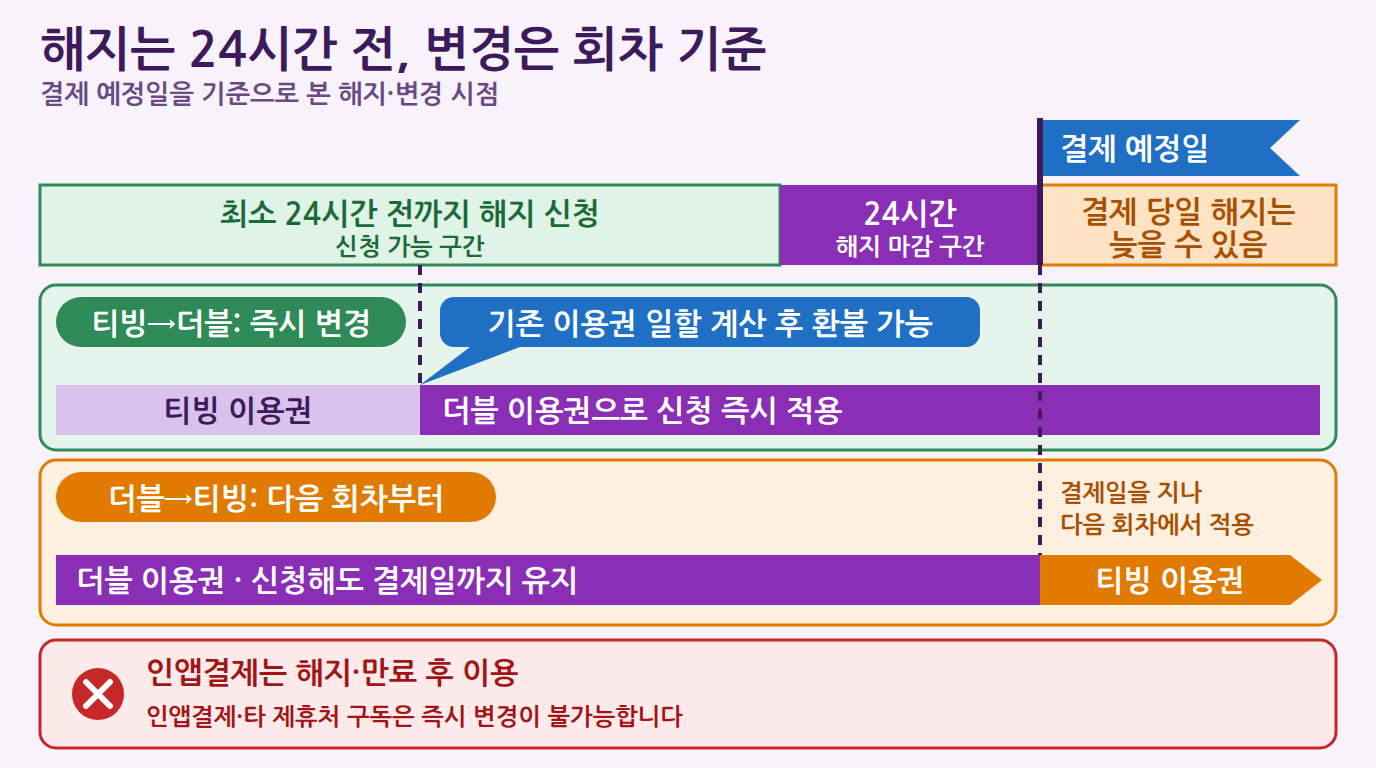
- Changing from a TVING plan to a Double plan: You can change immediately. Your existing TVING plan is reduced by the number of days used (pro-rated), and the remaining amount, minus fees, may be refunded[1].
- Returning from a Double plan to a TVING plan: It does not apply immediately. It applies from the next recurring payment cycle[1]. If you no longer need the Double plan, you must submit the change request before the payment date.
- If you subscribe through in-app payment or another partner: You cannot change your plan immediately. You can use a Double plan after you cancel or let the existing plan expire[1].
- Canceling automatic payment: You must apply at least 24 hours before the scheduled payment date[1]. If you cancel on the morning of the payment day, you may not be able to stop the payment for that cycle.
Frequently Asked Questions
Q1. What happens if I try to watch content that the ad-supported plan does not allow?
You cannot play that content until you upgrade your plan. If the title you want is restricted, you can switch to a higher plan[2].
Q2. Which plans can watch Apple TV+ content?
You need a Premium plan[2]. If you use TVING through a Double plan, it is provided only if you subscribe to Double Premium[1]. Apple TV+ content is excluded from Double Slim, Basic and Standard[1][1][1].
Q3. Is the number of TVING downloads the same on every Double plan?
No. TVING downloads are 15 per month on Double Slim[1], 200 per month on Double Basic[1], 300 per month on Double Standard[1], and 400 per month on Double Premium[1]. Wavve downloads are unlimited[1][1][1].
Q4. If I subscribe through in-app payment, can I switch to a Double plan right away?
No, you cannot switch right away. If you have a plan subscribed through in-app payment or another partner, an immediate change is not possible, and you can use a Double plan after canceling or after the plan expires[1].